

Rewardly + Papaya POS
POS system for hospitality and retail
Papaya POS loyalty program
POS integration with Rewardly
Staff scan the customer's Rewardly card and Papaya POS instantly asks what the customer can use on this bill. Rewardly returns the discounts and a short message for staff. Once the bill is paid, the till sends the order and Rewardly adds points, stamps or cashback.
- Connection
- Token plus three values in Papaya POS
- At the till
- Live offer on every card scan
- Multiple locations
- Yes, each location separately
- Plan
- Advanced, Professional, Enterprise
What it looks like at the till
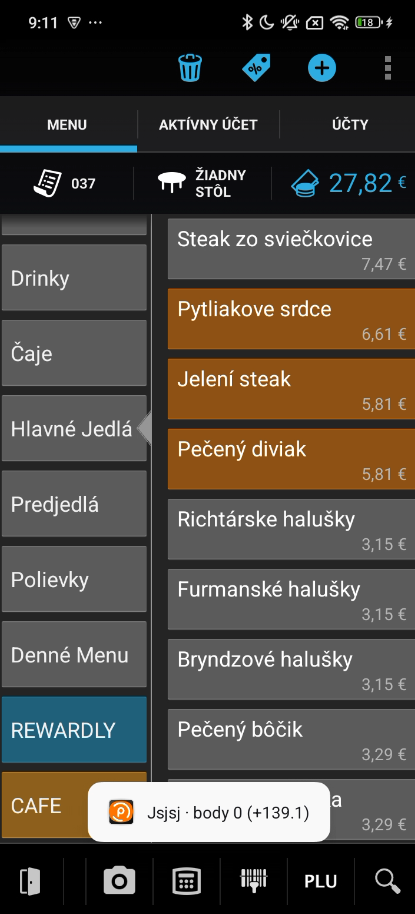
In Papaya POS, staff ring up the products first and then tap the customer's card. The till asks Rewardly right away and shows the points and rewards.
 1
1Tap the card
After ringing up, staff tap the card via the icon at the top. A notice shows the current points and the points for this purchase, for example +139.1.
 2
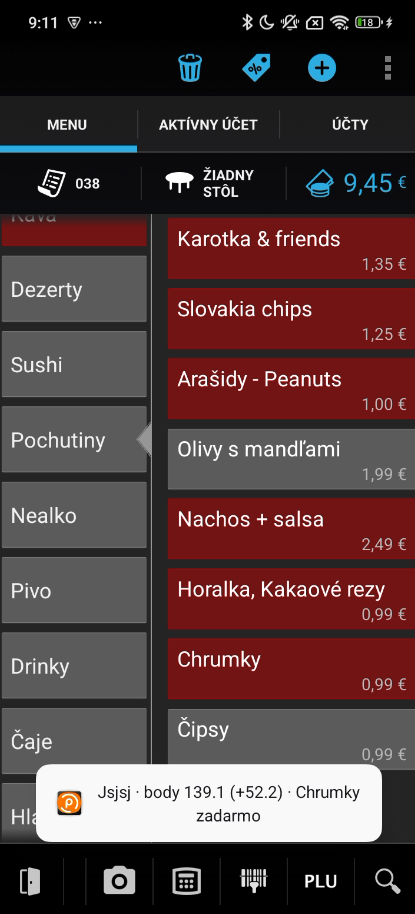
2Reward product first
For a reward, staff first add the reward product, for example Chrumky, and then tap the card. The notice shows the free reward.
 3
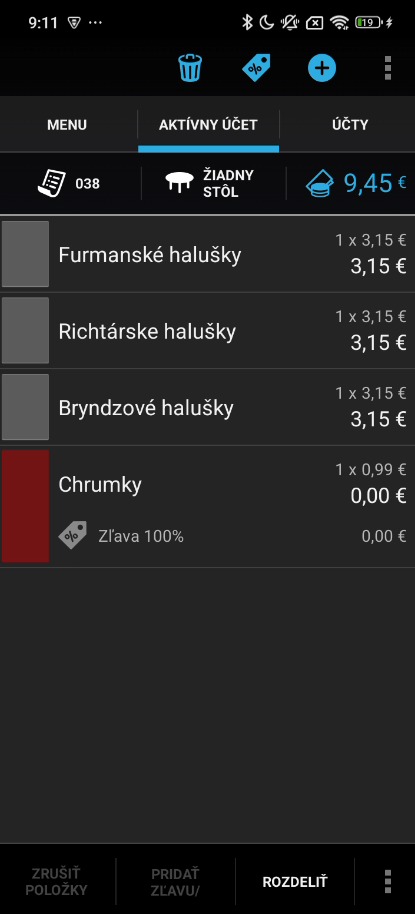
3The reward is applied
Zľava 100 % and a price of 0.00 € appear on the product by themselves. The bill is closed as usual.

 4
4Then in Rewardly
Once the bill is paid, Papaya POS sends the order to Rewardly. Points are added and the card on the customer's phone updates.


Good to know for your staff
- Products on the bill first, then tap the card.
- For a reward, the reward product must be on the bill before staff tap the card.
- Staff never enter points or discounts by hand.
Screenshots are for illustration. Prices, currency and product names will differ in your venue.
Why connect Papaya POS
No looking things up
Staff don't calculate or search for anything. A free product lands on the right line and discounts are worked out on the open bill.
Credit and cashback as payment
Customers can pay part of the bill with collected credit or cashback. It applies automatically, or only when staff ring up a product you choose.
The till never gets stuck
If Rewardly is ever briefly unavailable, Papaya POS receives an empty offer and checkout carries on without delay.
How it works
From connecting your till to a reward on your customer's card.
- 1
Connect a location
Enter the API address and access token from your Papaya POS admin in Rewardly. Rewardly then shows three values you paste into the Papaya POS settings.
- 2
Scan the card
At checkout, staff scan the customer's card. Papaya POS sends Rewardly the full basket and gets back the rewards, discounts and credit the customer can use.
- 3
Reward after payment
The paid order reaches Rewardly. The customer gets points, stamps or cashback and their Wallet card updates.
What the integration can do
- Reward check on every card scan
- Points, stamps, cashback and prepaid credit
- Free products, whole bill rewards and standing percentage discounts
- Product import from Papaya POS so rules can target specific items
- Several locations, each with its own connection
- Staff message in Slovak, Czech or English
What data is exchanged

From the POS to Rewardly
- The open bill when a card is scanned
- Paid orders
- Products and prices from Papaya POS
From Rewardly to the POS
- Discounts and rewards for the open bill
- A short message for staff
- A Papaya POS member card for every new Rewardly card
Balances are not stored in Papaya POS. The till reads the current state on every card scan.
Good to know before you connect
POS integrations are included in the Advanced, Professional and Enterprise plans.
Not sure the integration fits? Contact us
- You need access to the Papaya POS admin and an access token for each location.
- You enter the three values from Rewardly in Papaya POS by hand, in the webhook settings.
- The till recognizes customers only by scanning their Rewardly card.
- Credit is applied in full, up to the bill total.
- Member tiers are not shown on the Papaya POS till.
- A cancelled order does not automatically reverse points.
Common questions
A loyalty card in Apple Wallet or Google Wallet, push notifications to that card and discounts applied live to the open bill when the cashier scans the card.
In Rewardly you add the Papaya POS API address and access token for the location. Rewardly then shows three values, two addresses and a token, which you enter in the Papaya POS settings under webhooks.
The till is never blocked. Papaya POS gets an empty offer with a short note that loyalty is temporarily unavailable, and the sale goes through as usual.
Compare Papaya POS with other POS systems





Go live today.
Two ways.
Book a 30-minute call and we'll build your card together, or let our AI set it up in 2 minutes. Your choice.
AI Setup in 2 minutes

Our AI designs your loyalty card, sets up your program and gets you live, all in under 2 minutes. No designer needed.
Set it up with Rewardly AI14-day free trial · No prepayment required