

Rewardly + Storyous
POS system for restaurants
Storyous loyalty program
POS integration with Rewardly
When staff scan a Rewardly card, Storyous requests an offer for the open bill. They see the guest's name, points and stamps, tier, what this bill will earn and which rewards or credit can be used. Once the bill is paid, Rewardly records everything.
- Connection
- Connection code in Storyous
- At the till
- Live offer on every card scan
- Multiple locations
- Yes, even several Storyous accounts
- Plan
- Advanced, Professional, Enterprise
What it looks like at the till
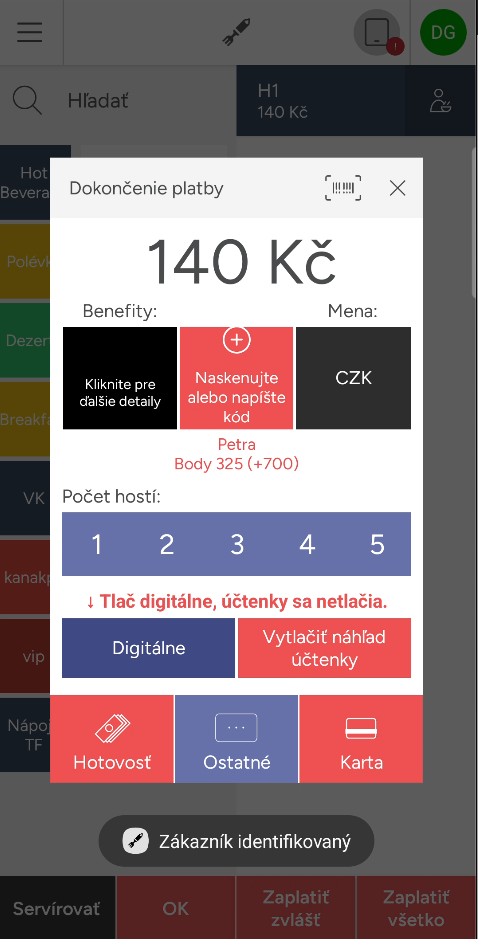
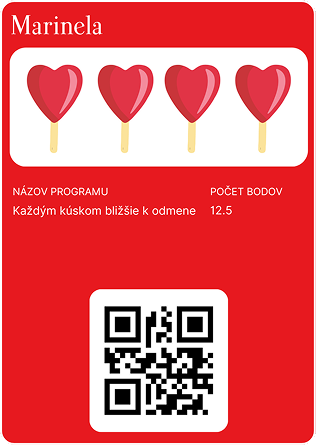
Staff ring up the bill in Storyous as usual. At payment they scan the Rewardly card on the customer's phone, and the till instantly shows who it is, what is on their card and what they can use.
 1
1Scan the card
At Zaplatiť všetko, staff scan the QR code on the card. Below the total the till shows the name and Body 325 (+700): the current balance and the points this bill earns.
 2
2Pick a reward
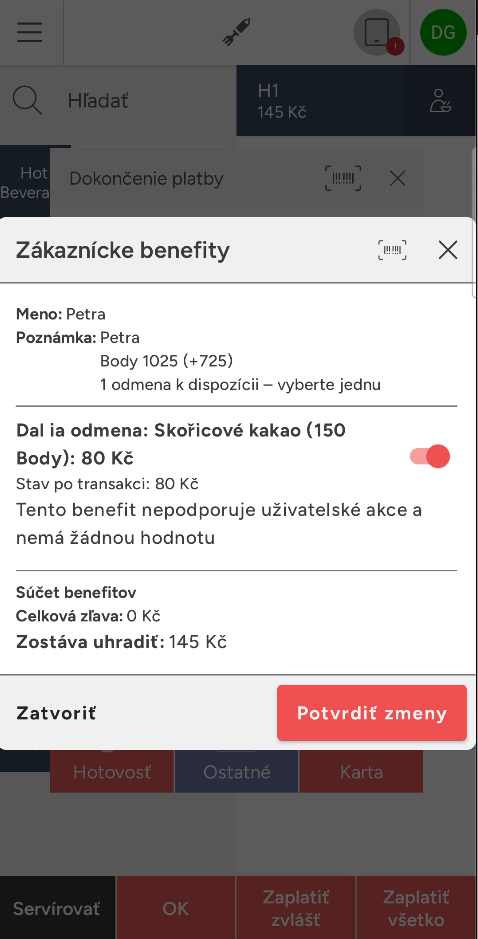
If the customer has enough points, a reward appears in the benefits. Staff switch it on and confirm.
 3
3The total updates
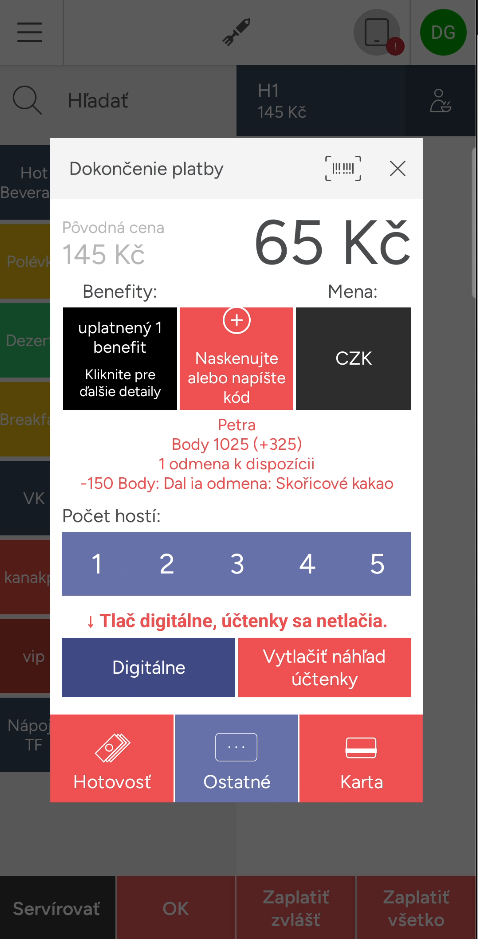
The reward's price is taken off the bill. Its points are deducted, and new points are earned on the reduced amount.

 4
4Then in Rewardly
Once the bill is paid, Storyous sends it to Rewardly. Points, stamps or cashback are added from the amount the customer actually paid, and the card on their phone updates.


Good to know for your staff
- Scan the card before payment. Nothing is added once the bill is closed.
- If the scanner can't read the code, staff can type it in via Naskenujte alebo napíšte kód.
- Customers can save a reward or credit for later. Staff simply switch it off at payment.
Screenshots are for illustration. Prices, currency and product names will differ in your venue.
Why connect Storyous
Stamp and reward on one bill
When this purchase fills a guest's stamp card, they can redeem the reward on the very same bill.
Staff stay in control
Rewards appear as vouchers staff can switch off. Pre-filled credit can be lowered or declined.
Rules built on your menu
Rewardly imports your Storyous menu, so you can set bonuses on specific dishes, drinks or categories.
How it works
From connecting your till to a reward on your customer's card.
- 1
Enter a code in Storyous
Get a connection code in Rewardly and enter it in the Storyous settings. You never share your Storyous password. Each place gets its own location in Rewardly.
- 2
An offer on every scan
Rewardly prices the open bill against your program rules and sends the till the rewards, credit and a preview of what the guest earns with this purchase.
- 3
Recorded after payment
Points and stamps are based on what the guest actually paid. If you cancel the bill, Rewardly reverses it.
What the integration can do
- Guest name, points, stamps and tier right on the till
- A preview of what the guest earns with this bill
- Part of the bill paid with credit or cashback
- One catalog reward bought with points per purchase
- Credit used and credit left printed on the bill
- Several places and several Storyous accounts in one program
What data is exchanged

From the POS to Rewardly
- The open bill when a card is scanned
- Paid and cancelled bills
- Menu: products, categories and prices
- Place names
From Rewardly to the POS
- Rewards, discounts and credit for the open bill
- The guest's points, stamps and tier
- Text for the till and the printed bill
Nothing is stored in Storyous. The till reads the current state on every card scan.
Good to know before you connect
POS integrations are included in the Advanced, Professional and Enterprise plans.
Not sure the integration fits? Contact us
- You need a Storyous account where the Rewardly loyalty feature can be enabled for the place.
- Guests need a Rewardly card. New members are not created at the till.
- Guests are found only by scanning their card, not by name or phone.
- One bill belongs to one guest.
- Points are spent at the till through catalog rewards, not as money.
- The menu updates when you connect, every night and on request.
Common questions
A loyalty card in Apple Wallet or Google Wallet, push notifications to that card and rewards shown live on the open bill. Staff see the guest's name, points, stamps and tier as soon as they scan the card.
No. You get a connection code in Rewardly and enter it in the Storyous settings. Rewardly never needs your Storyous password.
Yes. When a purchase fills a stamp card, the reward appears on that same open bill as a voucher, and the waiter can switch it off.
Compare Storyous with other POS systems





Go live today.
Two ways.
Book a 30-minute call and we'll build your card together, or let our AI set it up in 2 minutes. Your choice.
AI Setup in 2 minutes

Our AI designs your loyalty card, sets up your program and gets you live, all in under 2 minutes. No designer needed.
Set it up with Rewardly AI14-day free trial · No prepayment required